12 Operational Analysis
The report published on this website is a draft and subject to frequent updates. Please be aware that the content may change over time as revisions are made. Thank you for your understanding.
If you have questions, comments, or feedback, please contact Esteban Solorzano.
“What the system users must achieve”.
The Operational Analysis perspective analyses the issue of operational users (actors), by identifying stakeholders that have to interact with the system, their goals, activities, constraints and the interaction conditions between them. This perspective allows to model the required high-level operational capabilities and perform an operational needs analysis without even defining the system-of-interest, in fact the system may not even mentioned in this section (Cronin, n.d.).
12.0.1 Knowledge Repository
Figure 12.1 is a SysML block definition diagram that shows how the Medical Device Knowledge Repository (MDSE-KR) is decomposed.
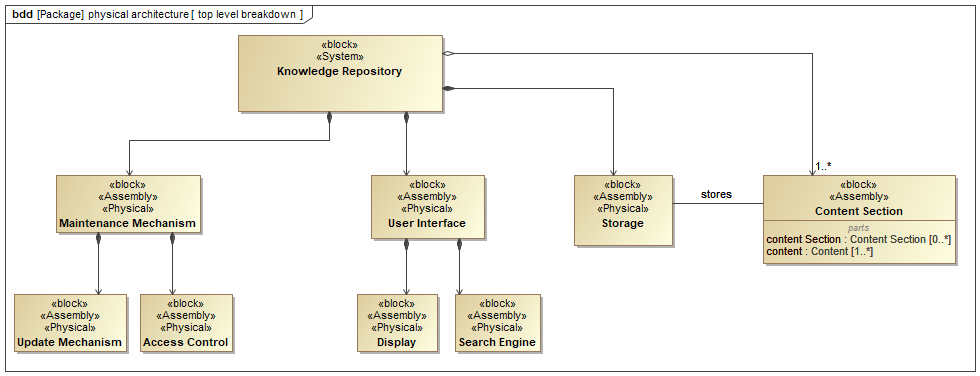
The core element of the system is the Knowledge Repository block. This block represents a database or information storage system that houses the medical device systems engineering knowledge. The system stores multiple Content Section elements, indicated by the notation “[1..*]”. This multiplicity signifies that the repository must contain at least one content section element, and the number of content section elements can be limitless. The content would likely encompasses details about regulatory, risk management, requirements management, and other relevant medical device systems engineering information.
The knowledge repository also includes a Search Engine component. This component plays a critical role in facilitating efficient retrieval of information from the knowledge repository. Users can leverage the search engine to locate specific knowledge items based on their needs.
The knowledge repository possesses the following key components:
- Maintenance Mechanism: This component maintains the accuracy and completeness of the knowledge over time. The specific mechanisms for maintenance are not explicitly shown in the diagram but could involve processes for adding, updating, and removing content.
- Storage: This content refers to the physical infrastructure responsible for storing the content. While the specific technology is not depicted, it likely involves a database server, physical medium or cloud-based storage solution.
- User Interface: Users can provide input, such as search queries, through the user interface. The system, in turn, can deliver output, such as search results or retrieved information, through the same channel.
The SysML block definition diagram portrays a knowledge repository for medical device systems engineering. The repository stores and manages essential information related to medical device systems engineering. Authorized users, such as systems engineers and consultants, can access and search the repository using a search engine. An administrator maintains the knowledge repository and ensures its integrity through appropriate maintenance mechanisms. This system architecture facilitates knowledge sharing and access within the medical device industry.
12.1 System Use Cases
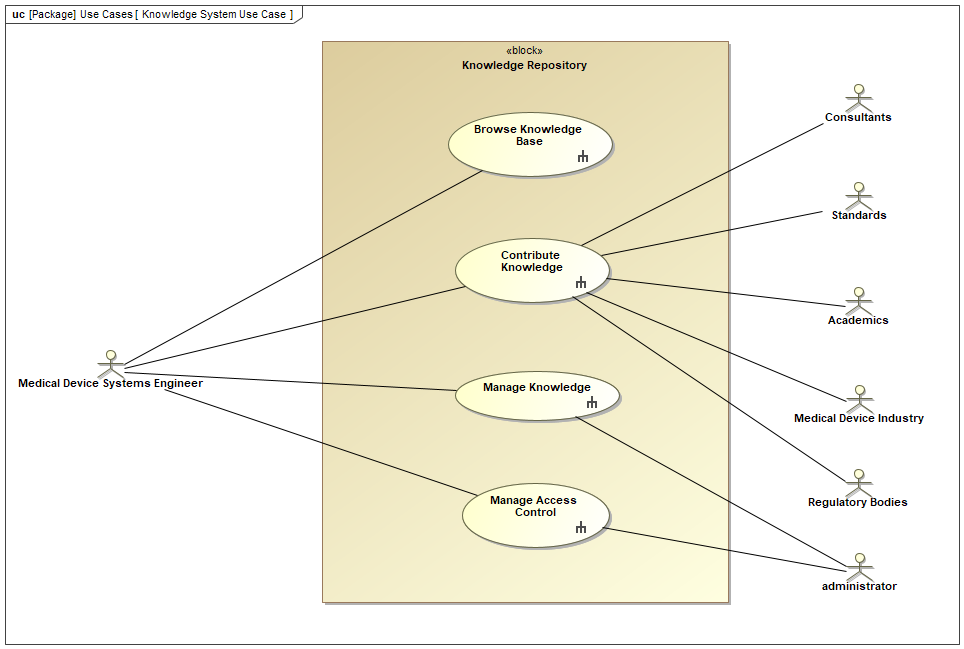
This section analyzes the knowledge repository system use cases and modeled with a SysML use case diagram. Figure 12.2 depicts a central block representing the knowledge repository itself, surrounded by actors and their associated use cases.
12.1.1 Actors and their Roles
- Medical Device Systems Engineer: This primary actor interacts with the system for browsing, searching, contributing, and updating knowledge relevant to medical device engineering.
- Consultants: Similar to systems engineers, consultants utilize the system for various knowledge management tasks.
- Standards Bodies: This actor leverages the repository to access and potentially contribute knowledge related to medical device standards.
- Academics: This actor participates by searching for and potentially contributing knowledge that furthers the academic understanding of medical devices.
- Regulatory Bodies: Regulatory bodies interact with the system to access relevant knowledge for their oversight functions within the medical device industry.
- Administrator: This privileged actor plays a crucial role in managing access control, determining what information different actor types can view and update within the repository.
Use Cases and System Functionality:
- Browse Knowledge: This use case allows actors to explore the knowledge repository freely, potentially leading to serendipitous discovery of relevant information.
- Contribute Knowledge: This use case empowers qualified actors, such as engineers and consultants, to enrich the repository by adding new knowledge.
- Manage Knowledge: This use case enables actors to maintain the accuracy and relevance of the repository by allowing them to add and update content.
- Manage Access Control (Administrator): This restricted use case allows administrators to define and enforce access permissions, ensuring the integrity and security of the knowledge repository.
12.1.2 Browse Knowledge Use Case
12.1.2.1 Medical Device Systems Engineer Perspective
Figure 12.3 is a diagram of the use case Browse Knowledge from the perspective of the Medical Device Systems Engineer. This use case signifies the core function where the Medical Device Systems Engineer (MDSE) can navigate and explore the MDSE-KR.
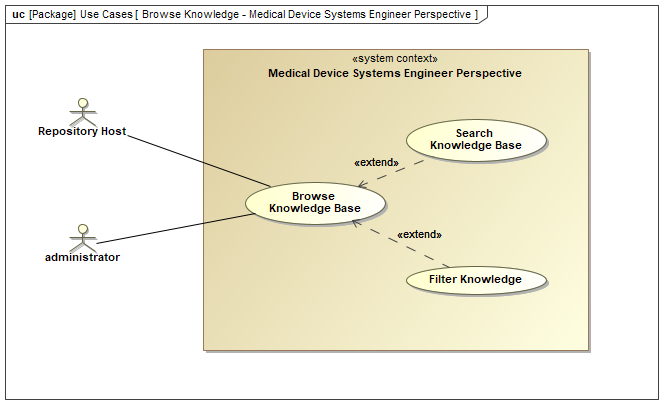
The system allows for optional extensions to this functionality through:
Search Knowledge Base: This allows the MDSE to look for specific information within the repository using keywords.
Filter Knowledge Base: This enables the MDSE to filter the knowledge base based on pre-defined categories (e.g., standards, design principles, risk management)to narrow down the search results.
12.1.3 Contribute Knowledge Use Case
12.1.4 Manage Knowledge Use Case
Figure 12.4 is a SysML use case diagram that focuses on the responsibilities of the Knowledge Repository Administrator. The primary use case, “Manage Knowledge Base Content,” is decomposed into its constituent functions: adding, editing, and deleting entries. This highlights the Administrator’s role in maintaining the knowledge base.
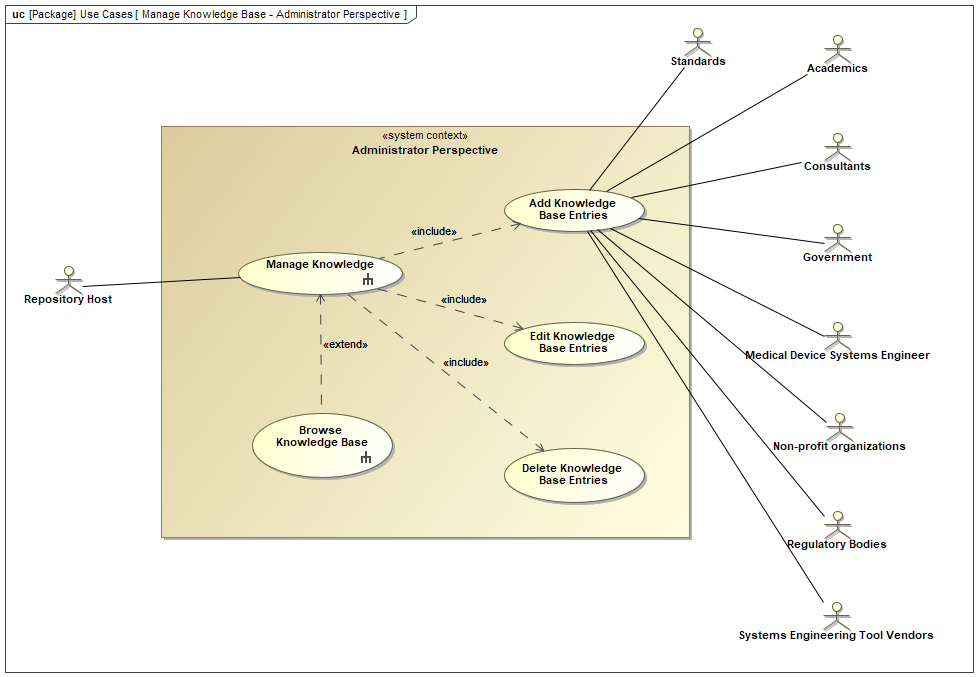
The SysML use case diagram depicts the core functionalities of the Knowledge Repository Administrator. The primary use case, “Manage Knowledge Base Content,” represents the Administrator’s responsibility for maintaining the knowledge base. The breakdown of this use case into its constituent parts (Add, Edit, Delete) provides clarity on the specific actions the Administrator can perform.
Here’s a further breakdown of the functionalities:
Add Knowledge Base Entries: This allows the Administrator to incorporate new information, articles, or resources into the knowledge base.
Edit Knowledge Base Entries: This empowers the Administrator to update existing content within the knowledge base to ensure accuracy and reflect changes.
Delete Knowledge Base Entries: This grants the Administrator the ability to remove outdated or irrelevant information from the knowledge base.
The optional “Browse Knowledge Base” use case acknowledges that the Administrator might need to browse the repository for reference.
12.1.5 Manage Access Control Use Case
12.1.6 Collaboration and Knowledge Sharing
The presence of diverse actors and their associated use cases highlights the collaborative nature of the knowledge repository system. The system fosters knowledge sharing within the medical device industry, allowing engineers, consultants, and regulatory bodies to access and contribute valuable information. Academics and standards bodies can also benefit by leveraging the repository for research and standard development purposes.
The SysML use case diagram demonstrates a well-defined knowledge repository system designed to facilitate knowledge sharing and management within the medical device industry. The diverse set of actors and their associated use cases emphasize the system’s potential to serve a wide range of stakeholders. Future analysis could explore the system’s internal structure, including its knowledge representation and retrieval mechanisms, to provide a more comprehensive understanding of its functionality.
12.2 Operational Scenarios
The operational scenarios are created to demonstrate the use cases can be satisfied (validation).
12.2.1 Main System Operational Scenario
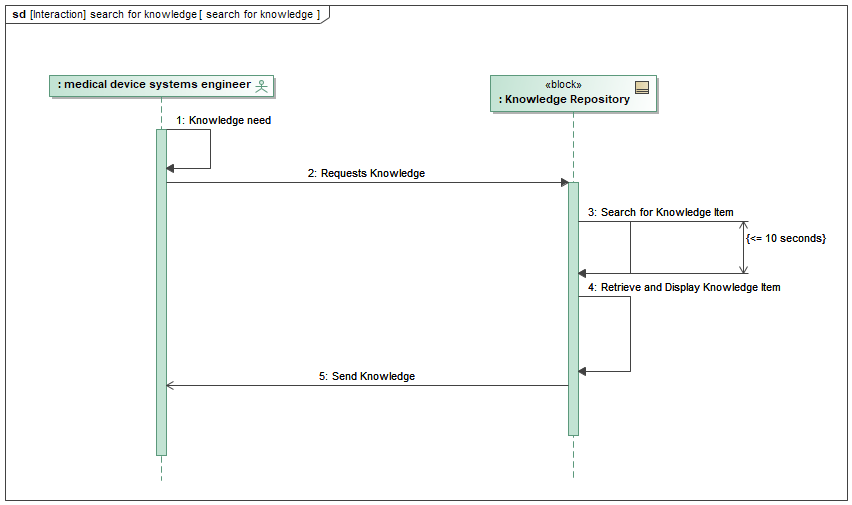
This section analyzes a SysML sequence diagram representing the interaction between a medical device systems engineer and a knowledge repository system. Figure 12.5 depicts the knowledge retrieval process crucial for informed systems engineering within the medical device development domain.
Actors and Interactions:
The sequence diagram focuses on two primary actors:
- Medical Device Systems Engineer: This actor represents the user of the system, an engineer seeking knowledge pertinent to medical device design or development.
- Knowledge Repository: This block represents the system component housing the relevant knowledge for medical device systems engineering.
The interaction commences with the activation of the Medical Device Systems Engineer. This signifies the engineer encountering a knowledge need, prompting them to initiate a search within the knowledge repository. The engineer transmits a request to the knowledge repository, likely specifying the desired knowledge domain or specific keywords related to their need.
Knowledge Retrieval Process:
Upon receiving the request, the knowledge repository executes a Search for Knowledge Item operation. This operation signifies the system’s internal process of identifying relevant knowledge within its storage. The diagram incorporates a time constraint, indicating that the search should be completed within 10 seconds or less. This emphasizes the system’s prioritization of search efficiency, ensuring timely knowledge retrieval for the engineer.
Following a successful search, the knowledge repository retrieves the identified knowledge item. This retrieved item could encompass various formats such as technical references, design guidelines, or regulatory guidelines relevant to medical devices. Finally, the knowledge repository transmits the retrieved knowledge item back to the engineer, enabling them to analyze the information and utilize it to address their specific knowledge need.
Significance for Medical Device Development:
This SysML sequence diagram offers a simplified yet insightful representation of a critical interaction within the medical device development process. Efficient access to relevant knowledge empowers engineers to make informed decisions concerning design, development, and regulatory compliance. The time constraint on the search operation underscores the importance of a well-structured and indexed knowledge repository, facilitating rapid retrieval of necessary information.
Further Considerations:
While this diagram provides a foundational understanding of the knowledge search process, further exploration could involve:
- Investigating alternative interaction scenarios, such as browsing by category or utilizing advanced search functionalities.
- Analyzing potential error conditions during the search process and the system’s response mechanisms.
- Considering the knowledge repository’s internal structure and indexing methods for efficient retrieval.
By delving deeper into these aspects, a more comprehensive understanding of the knowledge retrieval system and its impact on informed decision-making within the medical device development domain can be achieved.
12.2.2 Browse Knowledge Operational Scenarios
12.2.2.1 Browse Knowledge Base (Actor: Medical Device Systems Engineer)
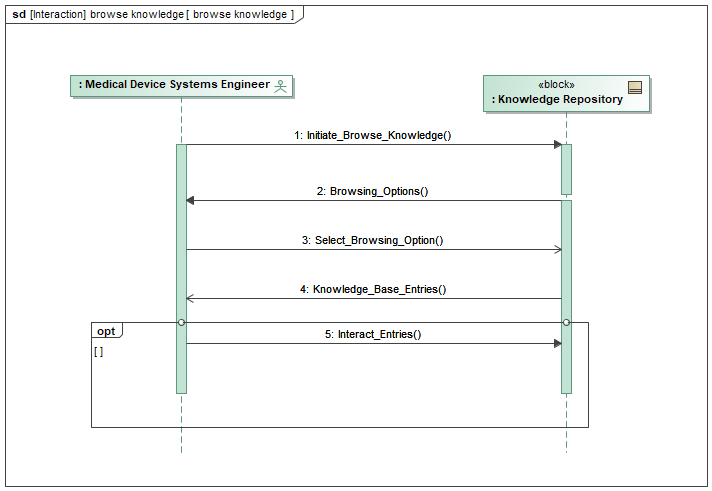
Figure 12.6 depicts the interaction between a Medical Device Systems Engineer (MDSE) and a Knowledge Repository system during the browsing of knowledge base entries.
The message sequence is the following:
MDSE Activates System: The MDSE initiates the interaction by activating the Knowledge Repository system, likely by launching the application or visiting a website.
System Provides Browse Options: The Knowledge Repository system responds by presenting the MDSE with browse options. These options might include browsing by category, topic, or keyword search.
MDSE Selects Browse Option: The MDSE selects a desired browse option. In this specific diagram, the option chosen is to browse by category.
System Sends Category List: The Knowledge Repository system sends a list of available categories to the MDSE.
MDSE Selects Category: The MDSE selects a category of interest from the list provided by the system.
System Sends Knowledge Base Entries: The Knowledge Repository system retrieves knowledge base entries matching the selected category and sends them to the MDSE.
MDSE Reviews Entries: The MDSE reviews the list of knowledge base entries provided by the system. This might involve reading titles, descriptions, or summaries to determine if the entries are relevant to the MDSE’s needs.
(Optional) MDSE Selects Entry: If an entry is of particular interest, the MDSE might select it for further exploration (e.g., clicking on an article title to view its details).
The diagram highlights the key interactions:
- The system offers various browse options, allowing the MDSE to navigate the knowledge base efficiently based on their needs.
- Filtering by category provides a structured approach to exploring the knowledge base.
- The ability to review entry details empowers the MDSE to assess the relevance of each entry before potentially diving deeper.
12.2.2.2 Search Knowledge Base (Actor: Medical Device Systems Engineer)
Figure 12.7 is a SysML sequence diagram that illustrates the interaction when the MDSE utilizes the optional “Search Knowledge Base” functionality.
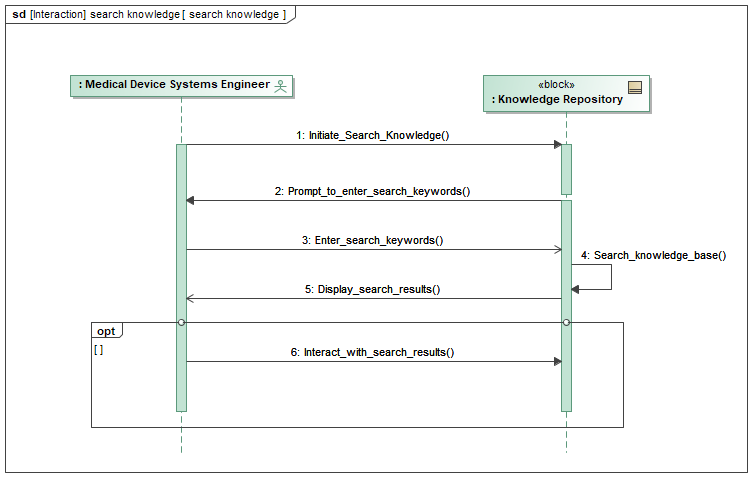
The MDSE activates the system and initiates the “Search Knowledge Base” use case. The Knowledge Base System prompts the MDSE to enter search keywords, after which the MDSE enters the keywords. The system then searches the knowledge base based on the entered keywords and displays the search results to the MDSE. Optionally, the MDSE can interact with the displayed search results.
Here’s a breakdown of the interaction:
The diagram starts with the engineer initiating the search for knowledge (
Initiate_Search_Knowledge()).The system prompts the engineer to enter search keywords (
Prompt_to_enter_search_keywords()).The engineer enters the search keywords (
Enter_search_keywords())The system utilizes the entered keywords to search the knowledge base (
Search_knowledge_base())Once the search is complete, the system displays the search results (
Display_search_results())Optionally, the engineer can interact with the search results (
Interact_with_search_results()) which likely involves further refining the search or selecting specific results for detailed viewing.
12.2.2.3 Filter Knowledge Base by Category (Actor: Medical Device Systems Engineer)
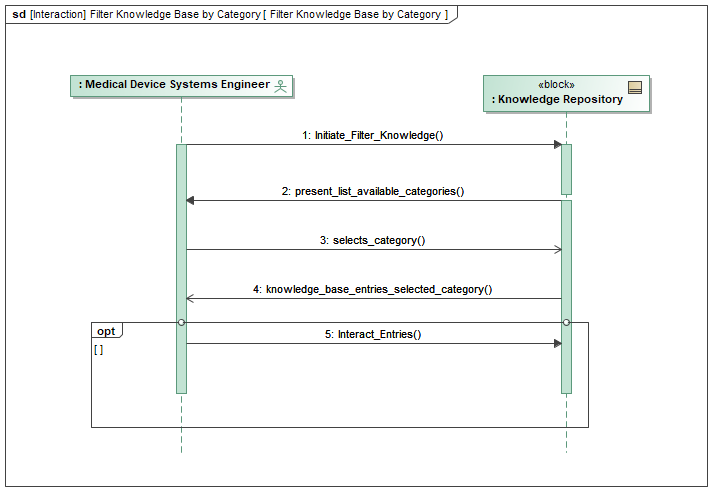
Figure 12.8 is a SysML sequence diagram that captures the step-by-step interaction between the MDSE and the Knowledge Base System during the process of filtering knowledge base entries by category. It begins with the MDSE activating the system and initiating the filtering use case. The Knowledge Base System then presents a list of available categories, allowing the MDSE to make a selection. Upon selecting a category, the system retrieves and displays the corresponding knowledge base entries. Finally, the MDSE has the option to interact with the displayed entries as needed.
Messages:
MDSE activates the system and initiates the “Filter Knowledge Base by Category” use case:
- The MDSE triggers the filtering process by activating the system, indicating the intent to filter the knowledge base entries based on a specific category.
Knowledge Base System presents a list of available categories to the MDSE:
Upon activation, the Knowledge Base System responds by presenting a list of available categories to the MDSE.
This message indicates the system’s readiness to receive input from the MDSE regarding the desired category for filtering.
MDSE selects a category from the list:
The MDSE selects a category from the presented list, specifying the criteria for filtering the knowledge base entries.
This interaction allows the MDSE to narrow down the search scope to retrieve relevant information.
Knowledge Base System retrieves and displays knowledge base entries belonging to the selected category:
Upon receiving the selected category from the MDSE, the Knowledge Base System retrieves and displays the knowledge base entries that correspond to the specified category.
This message signifies the system’s action of processing the MDSE’s request and presenting the filtered results accordingly.
MDSE (Optional): MDSE can interact with the displayed entries:
Optionally, the MDSE can interact with the displayed knowledge base entries to further analyze, review, or utilize the information.
This interaction provides flexibility to the MDSE in exploring the filtered results based on their specific requirements or preferences.
12.2.3 Contribute Knowledge Operational Scenario
12.2.4 Manage Knowledge Operational Scenario
12.2.4.1 Update Content
Figure 12.9 is a SysML sequence diagram that focuses on the use case, “Manage Knowledge,” identified in Figure 12.4 from the Administrator Perspective. It illustrates the interaction between the Administrator and the MDSE-KR System for adding a new content entry.
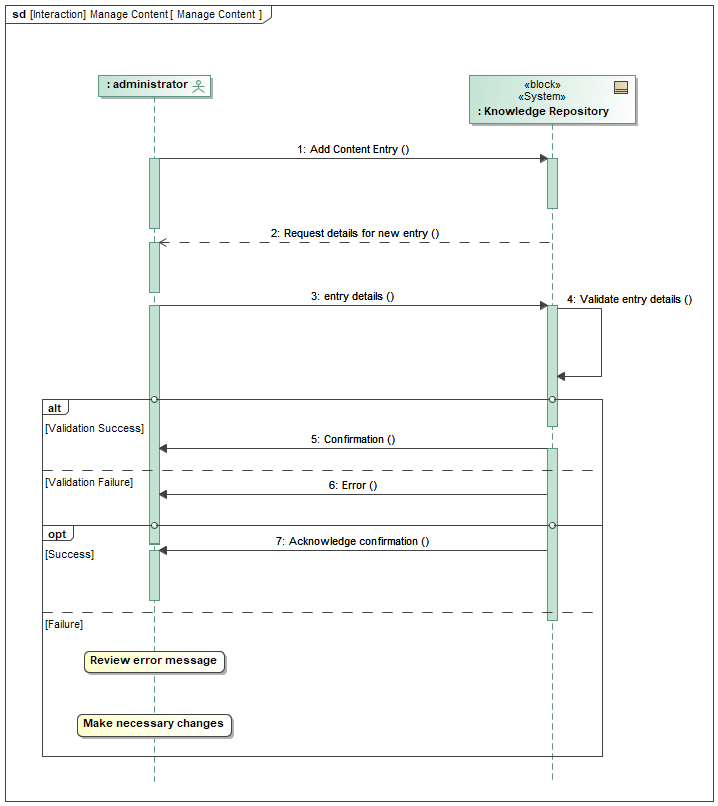
Elements:
Actors:
- MDSE-KR Administrator
Lifelines: Vertical dashed lines representing the actors and the system.
System: MDSE-KR System
Messages: Arrows depicting the interaction flow between the Administrator and the System.
Message Sequence:
Administrator: Activates the system by initiating the “Add Content Entry” functionality.
Knowledge Repository: Sends a message to the Administrator requesting details for the new entry. This might involve title, description, category selection, and potentially file upload options.
Administrator: Provides the required information for the new entry.
Knowledge Repository: Validates the information provided by the Administrator. This could involve checking for missing fields or ensuring compliance with formatting guidelines.
Knowledge Repository (Success): If validation is successful, the system stores the new entry in the knowledge base and sends a confirmation message to the Administrator.
Knowledge Repository (Failure): If validation fails, the system sends an error message to the Administrator explaining the issue and requesting corrections.
Administrator (Success): The Administrator acknowledges the confirmation message (optional).
Administrator (Failure): The Administrator reviews the error message, makes necessary changes to the entry details, and repeats steps 3-8.